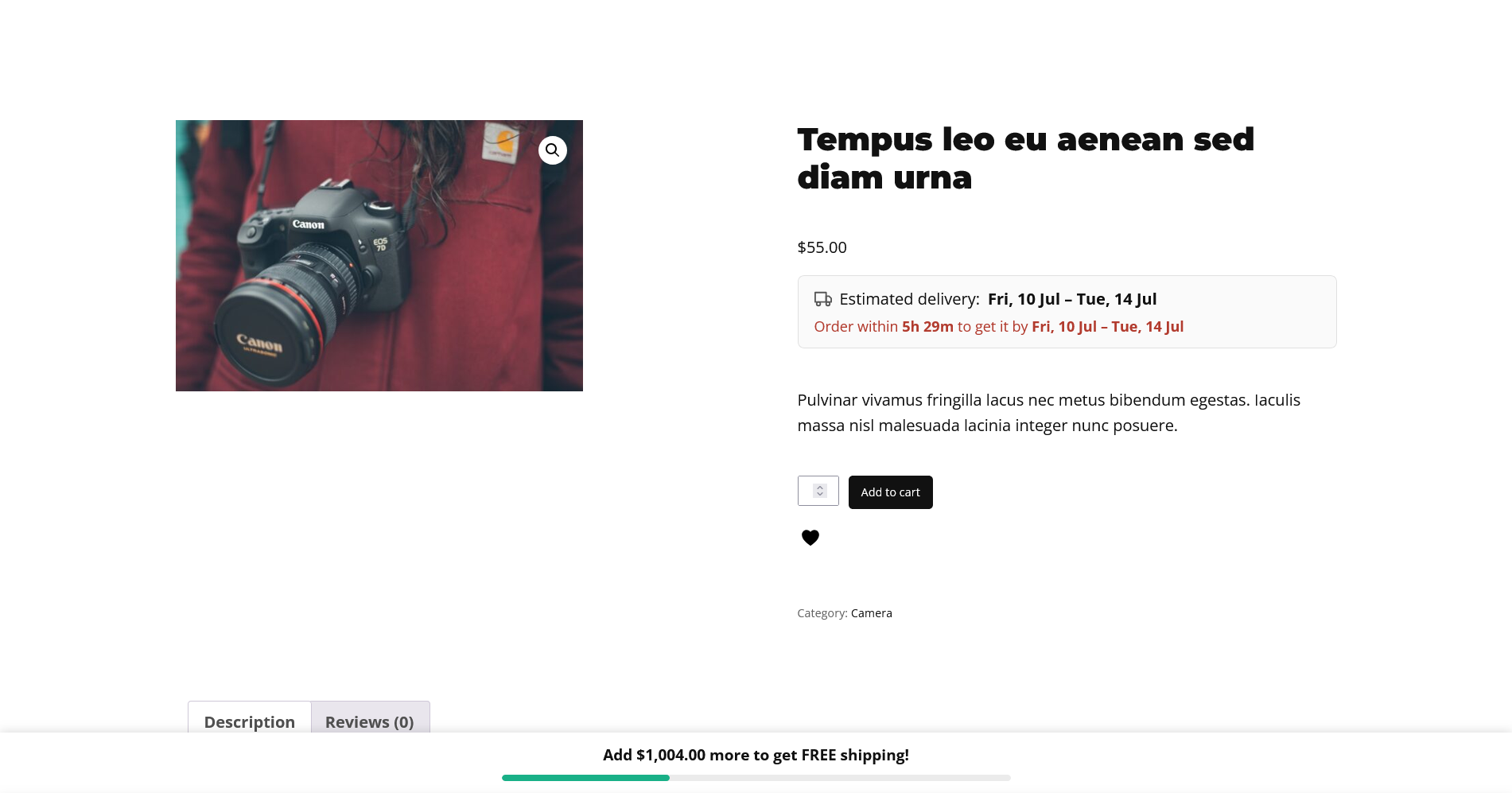
A shopper adds something to their basket, then pauses on the question that decides a surprising number of sales: “when will this actually arrive?” If your product page doesn’t answer it, some of them leave to check a competitor who does — and many don’t come back. Showing an estimated delivery date, right where the buying decision happens, removes that uncertainty at exactly the right moment. This guide explains why it works, what an accurate estimate has to account for, and how to add one to WooCommerce both with code and without.
Why a delivery date is worth adding
Delivery uncertainty is a quiet conversion killer. Shoppers rarely tell you they left because they weren’t sure when a parcel would arrive — they just don’t complete the order. The effect is strongest in three situations: on mobile, where people are less patient and less willing to hunt for shipping details; on gifts and occasion purchases, where arriving in time is the requirement; and with first-time visitors, who have no prior experience of your delivery speed to fall back on.
An estimated delivery date addresses all three at once. It doesn’t try to persuade anyone — it simply answers the question before it becomes a reason to hesitate, and it signals that you’re a real, organised store that knows its own logistics. That combination of reassurance and credibility is why a single line of text can move the needle on conversions.
A date beats a duration
“Ships in 3–5 business days” asks the shopper to do work: figure out what today is, count forward, skip the weekend, and guess at your dispatch time. People are both bad at this and unwilling to do it. “Arrives Tue, 8 Jul” requires zero effort and lands as a concrete promise. The information is identical; the presentation changes how it feels — and how much it reassures.
Dates also set a clearer expectation you can be measured against, which sounds risky but is actually an advantage: a parcel that beats its estimate delights, and shoppers trust a store that commits to a date more than one that hedges with a vague range.
What an accurate estimate has to account for
An honest delivery date is more than “today plus a few days”. To avoid either scaring shoppers with a pessimistic date or, worse, promising one you can’t keep, the calculation needs to consider:
- Processing time — how long you take to pick, pack, and dispatch before a parcel even ships.
- Transit time — how long the carrier takes, usually a range rather than a fixed number.
- A daily cut-off — an order at 11pm can’t realistically start processing “today”; it belongs to tomorrow.
- Weekends and non-working days — most stores don’t dispatch on Sunday, and many carriers don’t deliver then either.
- Public holidays — the same logic as weekends, on dates that move each year.
- The store’s timezone — “today” and the cut-off only make sense in one timezone, and it should be yours, not the server’s or the visitor’s.
Get any of these wrong and the estimate drifts out of accuracy — which, for a promise about delivery, is worse than showing nothing at all.
Method 1: A quick code snippet
You can add a basic estimate with a snippet in your child theme’s functions.php:
add_action( 'woocommerce_single_product_summary', function () {
    $processing = 1; // days to dispatch
    $transit    = 4; // days in transit
    $arrival = new DateTime( "+{$processing} days +{$transit} days" );

    echo '<p>Estimated delivery: <strong>'
       . esc_html( $arrival->format( 'D, j M' ) )
       . '</strong></p>';
}, 25 );
This prints a date on the product page, which is already better than nothing. But look at everything it quietly gets wrong: it ignores the time of day, so an 11pm order shows the same date as a 9am one. It counts Saturday and Sunday as working days, so a Friday order can promise a Sunday arrival that never happens. It has no cut-off, no holiday awareness, and no way to show a range or a countdown. To make it genuinely accurate you’d be layering on business-day arithmetic, a configurable cut-off, timezone handling, a holiday calendar, and a live timer — a real amount of code to write, test across timezones, and maintain as your logistics change.
Method 2: A plugin (accurate, no maintenance)
For an estimate that’s actually correct, a purpose-built plugin handles the edge cases for you. Estimated Delivery Date for WooCommerce calculates the date from your processing and transit times, rolls late orders past your daily cut-off to the next day, skips weekends when you want it to, works in your store’s timezone, and can show an optional “order within 2h 14m” countdown for urgency. Setup takes a couple of minutes:
- Install and activate the plugin alongside WooCommerce.
- Open Sproutient → Settings and enter your processing time, transit range, and cut-off.
- Choose the message, date format, and whether the estimate sits above or below Add to Cart, then save.
The estimate then appears on every product page and keeps itself current as the day goes on and the cut-off passes.
Advanced: when one estimate isn’t enough
Most stores start with a single store-wide estimate, and that’s the right place to begin. As you grow, a few situations call for more nuance:
- Made-to-order or backordered items genuinely take longer to dispatch than stock items, so a blanket processing time will be wrong for them.
- Different shipping zones have very different transit times — a domestic estimate shouldn’t be shown to an overseas visitor.
- Seasonal peaks (sales, holidays) stretch both processing and carrier times, so a fixed estimate can over-promise at exactly the busiest moment.
You don’t need to solve all of these on day one. Start with an honest store-wide estimate, and lean toward the conservative end of your transit range during busy periods.
Common mistakes to avoid
- Being optimistic to look faster. A tighter date you miss costs more trust than a slightly later one you beat. Under-promise.
- Forgetting the cut-off. Without one, evening shoppers see a date you can’t hit because processing won’t start until tomorrow.
- Counting weekends. If you don’t dispatch or deliver on weekends, your estimate shouldn’t either.
- Ignoring timezone. A cut-off in the wrong timezone quietly shifts every estimate by hours.
- Over-precise single dates. If your carrier is genuinely variable, a range is more honest than a single day you’ll sometimes miss.
Best practices once it’s live
- Place it near the price and Add to Cart button, where the buying decision happens — not buried in a shipping tab.
- Keep the wording short. “Arrives Tue, 8 Jul” reads instantly; a paragraph doesn’t.
- Add the countdown where it’s real. The “order within X” timer is powerful for same-day dispatch, but skip it if your processing time makes it meaningless.
- Revisit it after peak. If the holiday rush stretched your times, make sure the estimate went back to normal afterwards.
Frequently asked questions
Should I show a single date or a range?
A range (“8–10 Jul”) is more honest when your carrier’s transit time varies; a single date is punchier when it’s reliable. Match it to reality — an over-precise date you miss is worse than an accurate range.
Where should the estimate appear?
Near the price and Add to Cart button, where the buying decision happens. Above or just below the button both work — test which reads better on your product template.
Does an estimate replace a real shipping calculator?
No — it sets expectations early. Exact costs and options still come at checkout. The estimate’s job is to remove uncertainty on the product page so shoppers get that far.
Will it hurt my page speed?
Not if it’s built well — the date is calculated server-side and the plugin loads only on product pages, so the overhead is negligible.
What about international orders?
Start with a store-wide estimate that’s honest for your main market, and lean conservative for slower destinations. Per-zone estimates are a natural next step once the basics are working.
The bottom line
A snippet can print a date, but an accurate, honest estimate — one that respects your cut-off, weekends, timezone, and transit range, and adds urgency when it helps — is a real project to build and keep working. For most stores a dedicated plugin is the faster route to a product page that answers “when will it arrive?” the moment the shopper wonders, without you maintaining date arithmetic for the life of the store.